<?xml version="1.0" encoding="utf-8"?>
<feed xmlns="http://www.w3.org/2005/Atom">
    <id>https://vsreality.com/news</id>
    <title>VsReality Blog</title>
    <updated>2026-10-07T00:00:00.000Z</updated>
    <generator>https://github.com/jpmonette/feed</generator>
    <link rel="alternate" href="https://vsreality.com/news"/>
    <subtitle>VsReality Blog</subtitle>
    <icon>https://vsreality.com/img/favicon.ico</icon>
    <entry>
        <title type="html"><![CDATA[Kinisi now supports motor and platform position control]]></title>
        <id>https://vsreality.com/news/kinisi-position-control</id>
        <link href="https://vsreality.com/news/kinisi-position-control"/>
        <updated>2026-10-07T00:00:00.000Z</updated>
        <summary type="html"><![CDATA[Command a motor angle or a robot pose with Kinisi position control. Watch a real motor move through 90, 180, and 360 degrees, then return to zero.]]></summary>
        <content type="html"><![CDATA[<p>Kinisi firmware and the Python, JavaScript, and Arduino SDKs now support <strong>position control</strong>. Set a motor's target angle or a mobile platform's target pose, and the controller uses encoder feedback to track that target.</p>
<p>The feature is available in <strong>version 2.3.1</strong>, with setup controls and live position graphs in the <a href="https://kinisiclient.vsreality.com/" target="_blank" rel="noopener noreferrer" class="">Kinisi web client</a>.</p>
<h3 class="anchor anchorTargetStickyNavbar_Vzrq" id="watch-it-move">Watch it move<a href="https://vsreality.com/news/kinisi-position-control#watch-it-move" class="hash-link" aria-label="Direct link to Watch it move" title="Direct link to Watch it move" translate="no">​</a></h3>
<p>In this demo, motor 0 drives a 30 cm arm to <strong>90°, 180°, 360°, and back to 0°</strong>. The camera shows the complete movement in one continuous take, alongside the position response graph.</p>
<figure><div class="video_I8Nv" style="aspect-ratio:16 / 11"><iframe src="https://www.youtube-nocookie.com/embed/N8v6H8MnFKY" title="Kinisi motor position control: 90 degrees, 180 degrees, 360 degrees, and back to zero" loading="lazy" allow="accelerometer; autoplay; clipboard-write; encrypted-media; gyroscope; picture-in-picture; web-share" referrerpolicy="strict-origin-when-cross-origin" allowfullscreen=""></iframe></div><figcaption>Motor 0 moving a 30 cm arm in one continuous take. The graph is a synchronized replay of recorded encoder feedback; narration uses Kokoro.<!-- --> <a href="https://youtu.be/N8v6H8MnFKY">Watch on YouTube</a>.</figcaption></figure>
<h3 class="anchor anchorTargetStickyNavbar_Vzrq" id="motor-angles-and-platform-poses">Motor angles and platform poses<a href="https://vsreality.com/news/kinisi-position-control#motor-angles-and-platform-poses" class="hash-link" aria-label="Direct link to Motor angles and platform poses" title="Direct link to Motor angles and platform poses" translate="no">​</a></h3>
<p>Motor position is continuous: a target of 360° represents one full turn from the current origin. You can set a target, read the measured position, or reset the position origin to zero.</p>
<p>For mobile robots, platform position control accepts <strong>x, y, and heading</strong> targets in the world frame. Distances use meters, and angles use radians in the SDK commands. The web client's <strong>Angle units</strong> setting lets you work with degrees for angular targets, speeds, and graphs; your choice saves automatically in the browser.</p>
<h3 class="anchor anchorTargetStickyNavbar_Vzrq" id="two-controllers-working-together">Two controllers working together<a href="https://vsreality.com/news/kinisi-position-control#two-controllers-working-together" class="hash-link" aria-label="Direct link to Two controllers working together" title="Direct link to Two controllers working together" translate="no">​</a></h3>
<p>Position control builds on the velocity controller. The position PID turns the remaining distance or angle into a speed target, and the velocity PID drives the motor to track that speed. Each controller has its own <strong>Kp, Ki, and Kd</strong> settings. Platform control also has separate tuning for translation and heading.</p>
<p>Initialize and tune velocity control first, then initialize position control. Maximum speed and position tolerance let you choose how quickly the mechanism moves and how close it must get to the target.</p>
<h3 class="anchor anchorTargetStickyNavbar_Vzrq" id="try-position-control">Try position control<a href="https://vsreality.com/news/kinisi-position-control#try-position-control" class="hash-link" aria-label="Direct link to Try position control" title="Direct link to Try position control" translate="no">​</a></h3>
<p>Our tutorials cover the setup, explain the parameters, and show the web client controls:</p>
<ul>
<li class=""><a class="" href="https://vsreality.com/docs/kinisi-motor-controller/tutorials/velocity-control">Velocity control tutorial</a></li>
<li class=""><a class="" href="https://vsreality.com/docs/kinisi-motor-controller/tutorials/position-control">Position control tutorial</a></li>
</ul>
<p>Update your firmware and SDK to get started:</p>
<ul>
<li class=""><a href="https://github.com/szolotykh/kinisi-motor-controller-firmware/releases/tag/v2.3.1" target="_blank" rel="noopener noreferrer" class="">Controller firmware v2.3.1</a></li>
<li class=""><a href="https://pypi.org/project/pykinisi/2.3.1/" target="_blank" rel="noopener noreferrer" class="">Python package on PyPI</a></li>
<li class=""><a href="https://github.com/vsreality/jskinisi/releases/tag/v2.3.1" target="_blank" rel="noopener noreferrer" class="">JavaScript SDK and web client v2.3.1</a></li>
<li class=""><a href="https://github.com/szolotykh/ArduinoKinisi/releases/tag/v2.3.1" target="_blank" rel="noopener noreferrer" class="">Arduino SDK v2.3.1</a></li>
</ul>]]></content>
        <author>
            <name>Sergey Zolotykh</name>
            <uri>https://github.com/szolotykh</uri>
        </author>
    </entry>
    <entry>
        <title type="html"><![CDATA[Kinisi controller v0.4 is heading into production!]]></title>
        <id>https://vsreality.com/news/kinisi-controller-v04</id>
        <link href="https://vsreality.com/news/kinisi-controller-v04"/>
        <updated>2026-10-01T00:00:00.000Z</updated>
        <summary type="html"><![CDATA[Meet the new Kinisi board, with four motor channels, smarter drivers, motion sensing, and more room to build.]]></summary>
        <content type="html"><![CDATA[<p>Kinisi controller v0.4 has gone into production! We're excited to take the next step and bring this new board to life.</p>
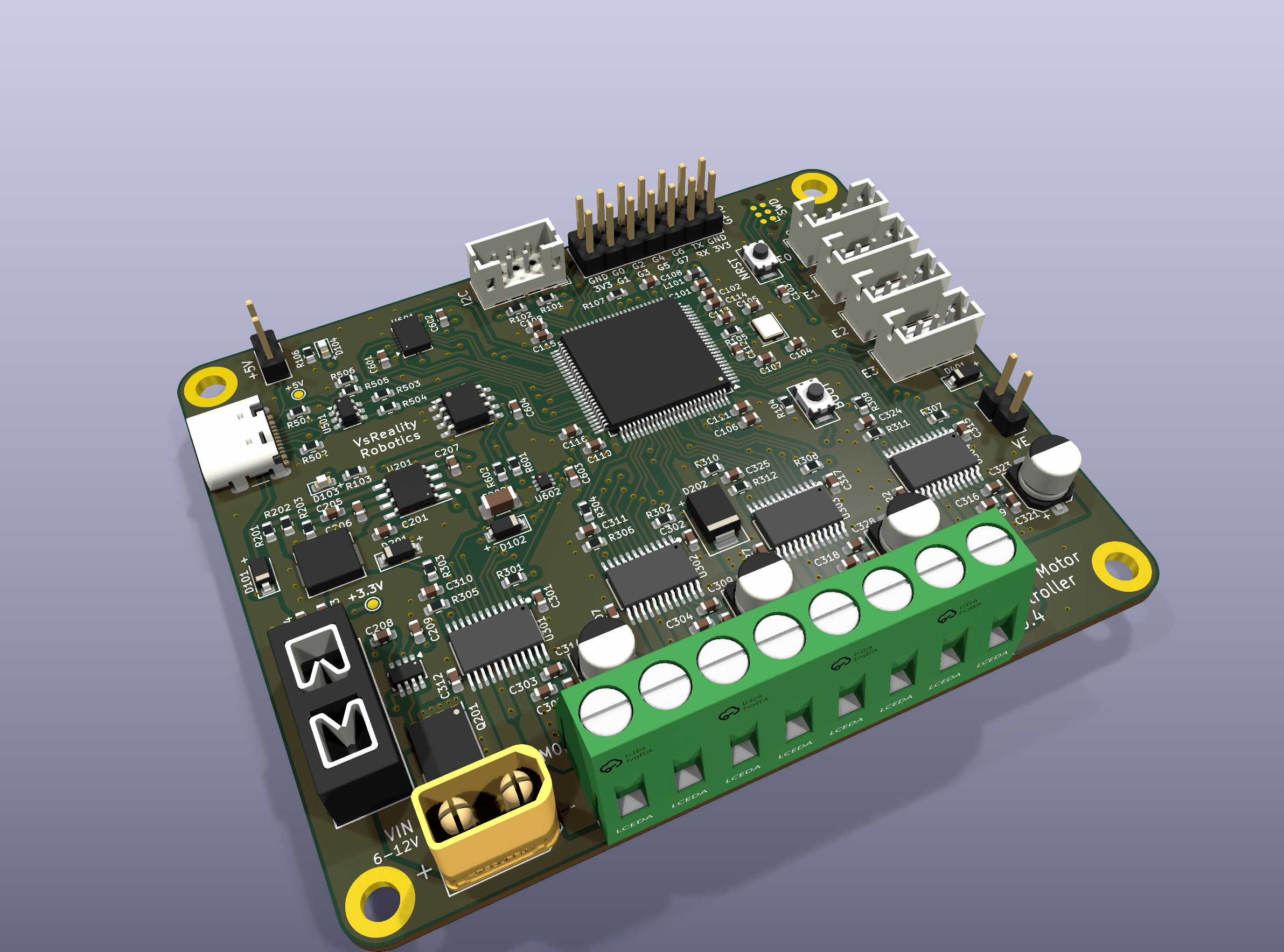
<p><img decoding="async" loading="lazy" alt="KiCad 3D render of the Kinisi controller v0.4 board" src="https://vsreality.com/assets/images/kinisi-v04-hero-bd5eb29575cf1f6d05199d23f7aa09b6.png" width="2384" height="1768" class="img_ev3q"></p>
<h3 class="anchor anchorTargetStickyNavbar_Vzrq" id="whats-exciting-about-v04">What's exciting about v0.4?<a href="https://vsreality.com/news/kinisi-controller-v04#whats-exciting-about-v04" class="hash-link" aria-label="Direct link to What's exciting about v0.4?" title="Direct link to What's exciting about v0.4?" translate="no">​</a></h3>
<ul>
<li class=""><strong>Smarter motor drivers.</strong> New DRV8873S drivers add SPI settings, fault reporting, and current sensing for each motor channel. That gives the controller more information about what the motors are doing.</li>
<li class=""><strong>Motion sensing on the board.</strong> A BMI088 accelerometer and gyroscope give your robot a way to measure movement and rotation.</li>
<li class=""><strong>Temperature sensing and lasting memory.</strong> A TMP102 measures board temperature, and FRAM can keep settings and data when power is off.</li>
<li class=""><strong>More ways to connect.</strong> USB-C, UART, I²C, and eight GPIO pins give you room to add sensors and other hardware.</li>
</ul>
<p>Kinisi still brings <strong>four brushed DC motor channels and four encoder inputs</strong> together on one board. Encoder feedback lets a controller track how far and how fast each motor turns.</p>
<p>The board also includes a replaceable fuse, reverse-polarity protection, and a TVS diode for short motor-power transients.</p>
<h3 class="anchor anchorTargetStickyNavbar_Vzrq" id="whats-next">What's next?<a href="https://vsreality.com/news/kinisi-controller-v04#whats-next" class="hash-link" aria-label="Direct link to What's next?" title="Direct link to What's next?" translate="no">​</a></h3>
<p>The next step is to bring up and test the manufactured boards. v0.4 uses a new motor-control interface and pin map, so it needs firmware made for this revision before driving motors. We'll share more as testing progresses.</p>
<p>The image above is a fresh KiCad render of the board design. Follow along at <a href="https://www.instagram.com/vsrealityrobotics/" target="_blank" rel="noopener noreferrer" class="">VsReality Robotics on Instagram</a>.</p>
<p>What would you build with four motor channels?</p>]]></content>
        <author>
            <name>Sergey Zolotykh</name>
            <uri>https://github.com/szolotykh</uri>
        </author>
    </entry>
    <entry>
        <title type="html"><![CDATA[Kinisi SDK v2.1.0 brings connection monitoring and live motion updates]]></title>
        <id>https://vsreality.com/news/kinisi-sdk-v2-1</id>
        <link href="https://vsreality.com/news/kinisi-sdk-v2-1"/>
        <updated>2026-09-14T00:00:00.000Z</updated>
        <summary type="html"><![CDATA[Configurable heartbeats, automatic motion readings, and USB disconnect handling for Kinisi motor controllers.]]></summary>
        <content type="html"><![CDATA[<p>Kinisi controller firmware and the Python, JavaScript, and Arduino SDKs have reached version 2.1.0. This update makes it easier to follow your robot's movement and respond when its control connection is lost.</p>
<p>The main improvements are:</p>
<ul>
<li class=""><strong>Connection monitoring.</strong> The SDKs can keep track of an idle connection with lightweight heartbeats. When the configured timeout expires, the controller stops driving the motors. Normal commands count as activity, so busy connections don't need extra heartbeat messages.</li>
<li class=""><strong>Automatic motion updates.</strong> Subscribe to encoder or robot-position readings at your chosen interval instead of requesting each reading separately. Every update keeps its original measurement timestamp.</li>
<li class=""><strong>USB disconnect handling.</strong> USB disconnect notifications now stop motor output and clear the old control session. Reconnecting does not automatically resume movement.</li>
</ul>
<p>The familiar commands for requesting a single motion reading are still available. Python and JavaScript handle heartbeats in the background; Arduino sketches service them through <code>poll()</code> in the main loop.</p>
<h3 class="anchor anchorTargetStickyNavbar_Vzrq" id="get-the-release">Get the release<a href="https://vsreality.com/news/kinisi-sdk-v2-1#get-the-release" class="hash-link" aria-label="Direct link to Get the release" title="Direct link to Get the release" translate="no">​</a></h3>
<p>Update your controller firmware and SDK together to use the new features:</p>
<ul>
<li class=""><a href="https://github.com/szolotykh/kinisi-motor-controller-firmware/releases/tag/v2.1.0" target="_blank" rel="noopener noreferrer" class="">Controller firmware v2.1.0</a></li>
<li class=""><a href="https://github.com/szolotykh/pykinisi/releases/tag/v2.1.0" target="_blank" rel="noopener noreferrer" class="">Python SDK v2.1.0</a></li>
<li class=""><a href="https://github.com/vsreality/jskinisi/releases/tag/v2.1.0" target="_blank" rel="noopener noreferrer" class="">JavaScript SDK and web client v2.1.0</a></li>
<li class=""><a href="https://github.com/szolotykh/ArduinoKinisi/releases/tag/v2.1.0" target="_blank" rel="noopener noreferrer" class="">Arduino SDK v2.1.0</a></li>
</ul>
<p>You can also open the <a href="https://kinisiclient.vsreality.com/" target="_blank" rel="noopener noreferrer" class="">Kinisi web client</a> to connect from a supported browser.</p>]]></content>
        <author>
            <name>Sergey Zolotykh</name>
            <uri>https://github.com/szolotykh</uri>
        </author>
    </entry>
    <entry>
        <title type="html"><![CDATA[Kinisi controller SDK v2.0.0 is here]]></title>
        <id>https://vsreality.com/news/kinisi-sdk-v2</id>
        <link href="https://vsreality.com/news/kinisi-sdk-v2"/>
        <updated>2026-09-14T00:00:00.000Z</updated>
        <summary type="html"><![CDATA[Easier connections, timestamped motion readings, and a clearer web client for Kinisi motor controllers.]]></summary>
        <content type="html"><![CDATA[<p>Version 2.0.0 of the Kinisi controller SDKs is now available for Python, JavaScript, and Arduino, alongside an updated controller firmware release.</p>
<p>We're continuing to improve the tools that help you build and test your robots. This release makes connecting to a controller clearer and gives you more useful information about its movement.</p>
<p>The main improvements include:</p>
<ul>
<li class=""><strong>Clearer connection setup.</strong> Your software can identify the connected board and know when it's ready to use.</li>
<li class=""><strong>Timestamped motion readings.</strong> Position and rotation readings now include when they were measured. Python and JavaScript can synchronize time with the controller; Arduino uses time since the controller started.</li>
<li class=""><strong>Better feedback.</strong> Clearer error messages help explain when a command cannot be completed.</li>
<li class=""><strong>An improved web client.</strong> Reorganized controls and readable timestamps make encoder and robot-position readings easier to follow.</li>
</ul>
<h3 class="anchor anchorTargetStickyNavbar_Vzrq" id="get-the-release">Get the release<a href="https://vsreality.com/news/kinisi-sdk-v2#get-the-release" class="hash-link" aria-label="Direct link to Get the release" title="Direct link to Get the release" translate="no">​</a></h3>
<p>Download the firmware and the SDK for your project from GitHub:</p>
<ul>
<li class=""><a href="https://github.com/szolotykh/kinisi-motor-controller-firmware/releases/tag/v2.0.0" target="_blank" rel="noopener noreferrer" class="">Controller firmware v2.0.0</a></li>
<li class=""><a href="https://github.com/szolotykh/pykinisi/releases/tag/v2.0.0" target="_blank" rel="noopener noreferrer" class="">Python SDK v2.0.0</a></li>
<li class=""><a href="https://github.com/vsreality/jskinisi/releases/tag/v2.0.0" target="_blank" rel="noopener noreferrer" class="">JavaScript SDK and web client v2.0.0</a></li>
<li class=""><a href="https://github.com/szolotykh/ArduinoKinisi/releases/tag/v2.0.0" target="_blank" rel="noopener noreferrer" class="">Arduino SDK v2.0.0</a></li>
</ul>
<p><strong>Upgrading from version 1?</strong> Update both the controller firmware and your SDK together. Version 2 uses a new communication format and isn't compatible with version 1.</p>]]></content>
        <author>
            <name>Sergey Zolotykh</name>
            <uri>https://github.com/szolotykh</uri>
        </author>
    </entry>
</feed>